
HDMI to CSI Adapter
An RK628H bridge that captures HDMI over MIPI CSI-2 at up to 4K 30, with EDID control.
The adapter converts an HDMI source into a 4-lane MIPI CSI-2 stream at up to 4K 30, so a Rockchip host can capture HDMI through its camera interface. It exposes EDID, which is how you tell a source what resolution and refresh rate to send. HDMI audio is recovered on-board and comes out as analogue stereo.
Two versions: 22-pin and 30-pin
The same RK628H bridge and the same capture modes ship on two carriers that differ only in how they mate to a host:
- 30-pin, for the Firefly ROC-RK3576-PC and other hosts with a 30-pin 0.5 mm MIPI CSI-2 connector. Every measurement on this page was taken on this version.
- 22-pin, for the Luckfox Aura (Rockchip RV1126B) and other boards that bring MIPI CSI out on the common 22-pin, Raspberry-Pi-style camera connector. Paired with an Aura and the WarpKVM image, this version is also the minimal build of the DIY Kit: one CSI link into the Aura's CSI0, HDMI input only. The kit's own carrier board routes both CSI ports and adds PoE; see the DIY hardware guide for how the two builds compare.
Pick the version that matches your host's camera connector at checkout. The bridge, the driver, the EDID surface, and every mode in the tables below are identical. The one internal difference is the audio path: the 30-pin board decodes HDMI audio to analogue on an on-board DAC, while the 22-pin board breaks the I2S lines out to header pins for the host's own audio input.
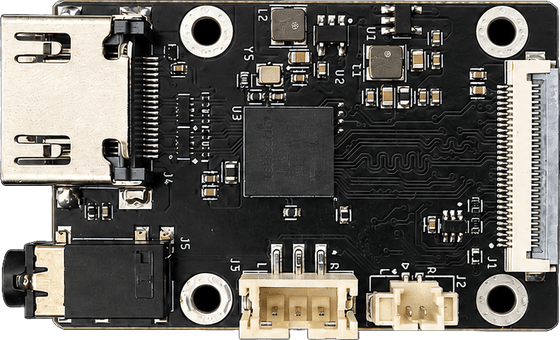
Everything below was measured on a Firefly ROC-RK3576-PC. Where something is untested, it says so.
Specifications
Video
| Item | Detail |
|---|---|
| Bridge chip | RK628H |
| HDMI input | Up to 4K @ 60, YUV420 |
| HDMI version | 1.4 and 2.0, 8/10-bit per component |
| CSI output | 3840×2160 @ 30 · 1920×1080 @ 144 / 120 / 60 · 1280×720 @ 60 · 720×480 @ 60 |
| Output colour | YUV422 only, fixed in silicon |
Interface
| Item | Detail |
|---|---|
| Connector | 30-pin or 22-pin, 0.5 mm pitch (choose at checkout) |
| Lanes | 4 data lanes plus 1 clock lane |
| Control | I2C at 1.8 V, 2.2 kΩ pull-ups |
| Signals | Reset in, interrupt in, HDMI-detect out |
| Standard | MIPI D-PHY v1.2 |
Board
| Item | Detail |
|---|---|
| Dimensions | 46.25 × 30 mm (30-pin) · 45 × 30 mm (22-pin) |
| Mounting | 4× M2.5 on a 27 × 25 mm pattern (30-pin) · 30 × 23 mm (22-pin) |
| Power | 5 V via the FPC connector |
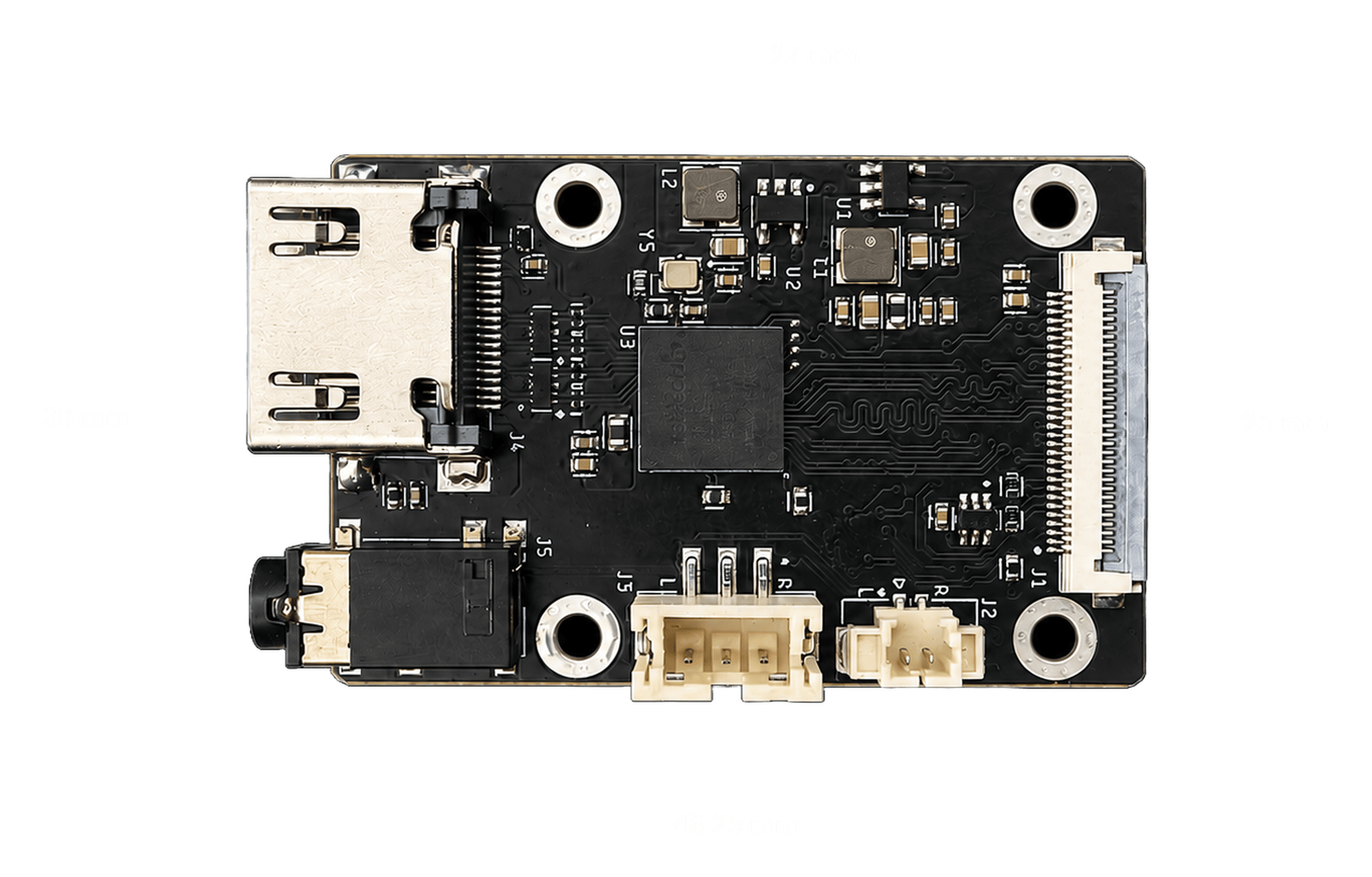
| Audio out | Analogue stereo line level: 3.5 mm jack plus 3-pin and 2-pin wafer |
Notes
| Item | Detail |
|---|---|
| Input vs output | The chip accepts 4K @ 60 in. What it can emit over CSI is the figure above. |
| Above 60 Hz | 1080p at 120 and 144 need our patched driver and a device tree change. 4K30 and 1080p60 work on stock Rockchip firmware. |
| Audio path | HDMI audio is decoded on-board to analogue. It does not reach the host, so it cannot be recorded or streamed. |
| Measured on | Rockchip RK3576, 300 to 400 frames per mode. |
Mechanical
The board is 46.25 × 30 mm with four M2.5 mounting holes on a 27 × 25 mm pattern, centre to centre. The HDMI receptacle shell overhangs the left board edge, so allow for it when designing an enclosure.
Reference documents
- WarpKVM HDMI to MIPI Board Product Specification (WKVM-SPC-001 Rev. A, PDF). The board's own specification: interfaces, validated modes, host requirements, mechanical drawing, and the limitations of the stock driver. Everything in it was measured on hardware.
- RK628H datasheet V1.1 (PDF). Rockchip's datasheet for the bridge itself. Useful if you are designing your own carrier or writing a driver for a host we do not list. It is hosted on a community mirror rather than by Rockchip, and it documents the chip rather than this board, so where the two disagree about what this product does, our specification is the one that was measured.
What you'll need
- An HDMI to CSI Adapter in the version that matches your host: 30-pin for a Firefly ROC-RK3576-PC, 22-pin for a Luckfox Aura
- The matching FPC cable, 30-pin or 22-pin, 0.5 mm pitch
- An HDMI source: a PC, console, or camera
- Optional: a monitor on the board's own HDMI output, to view the capture locally
On the Firefly you do not need to flash anything: the Rockchip BSP carries the driver and the factory image has the device tree entry, so 1080p60 and 4K30 work out of the box. On the Luckfox Aura the same driver is in the RV1126B kernel; our DIY Kit image wires it up, and the patch set below covers a from-scratch bring-up.
1. Connect
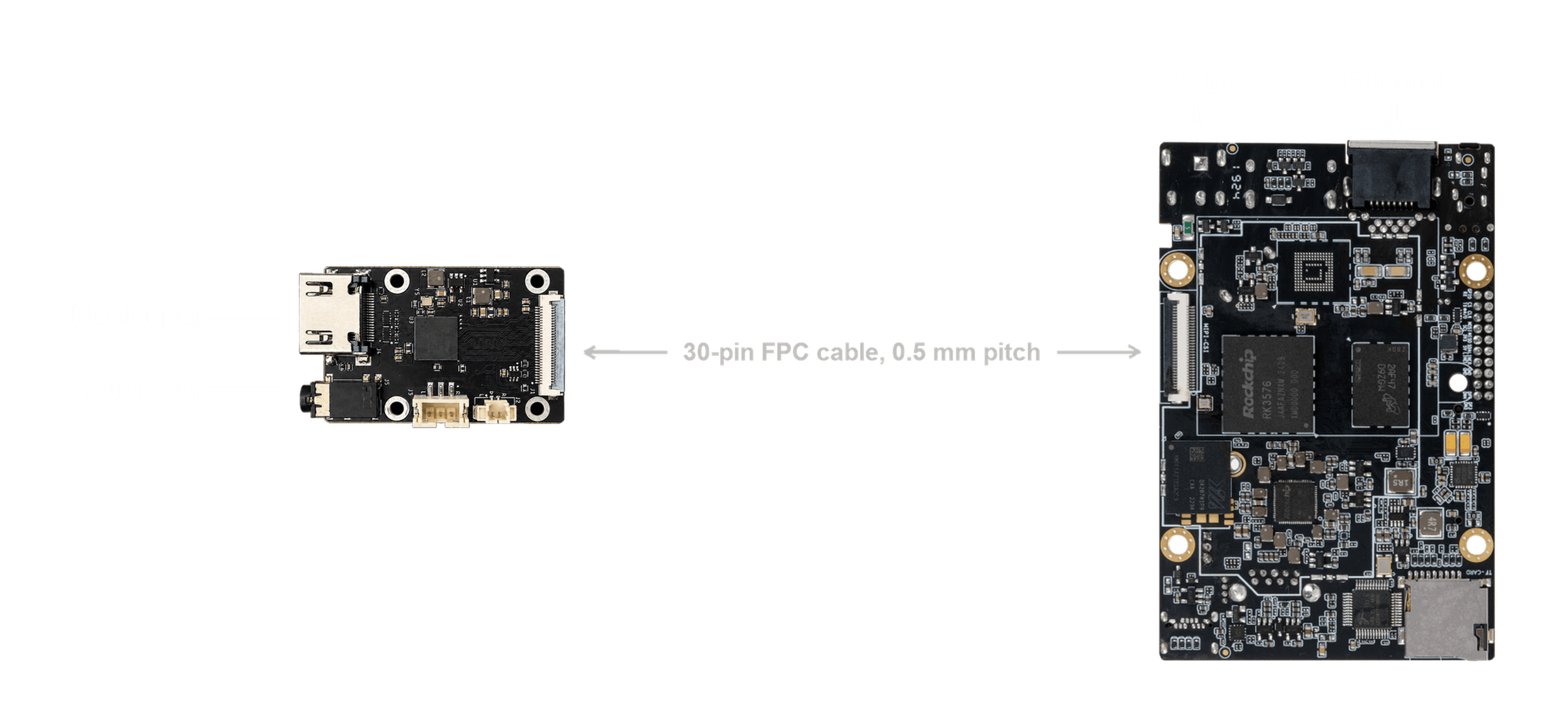
The card connects to the host with an FPC cable, 0.5 mm pitch: 30-pin on the Firefly version, 22-pin on the Aura version. Power the board off before seating it: the driver sequences the bridge's reset and enable lines once at probe, so seating it on a live board leaves the chip unconfigured and every register access fails until a full power cycle.
- Seat the FPC cable in the bridge and in the host's MIPI CSI camera connector. Check the contacts face the right way at both ends and that both latches are closed.
- Connect your HDMI source to the bridge's HDMI input.
- Optionally connect a monitor to the board's HDMI output.
- Connect Ethernet and 12 V DC to the host, then power on.
Audio, if you want it, comes off the card itself rather than the host: the 3.5 mm jack or either wafer connector.
2. Check it worked
# the bridge should be bound on I2C
ls /sys/bus/i2c/devices/*/name | xargs grep -l rk628

# what is the source sending?
v4l2-ctl -d /dev/v4l-subdev3 --get-dv-timings
A healthy 1080p60 source reports:
Active width: 1920    Active height: 1080
Pixelclock: 148503750 Hz (60.00 frames per second)
If it reports 640x480 at 25.175 MHz, that is the driver's placeholder for "no signal". Check the input cable and that the source is powered.
Subdevice numbering depends on probe order, so /dev/v4l-subdev3 is not
guaranteed. To find it reliably:
for s in /dev/v4l-subdev*; do
  echo -n "$s: "; v4l2-ctl -d "$s" --get-dv-timings 2>&1 | head -1
done
3. View the video
export DISPLAY=:0
export XAUTHORITY=/home/firefly/.Xauthority
export LD_LIBRARY_PATH=$LD_LIBRARY_PATH:/usr/lib/aarch64-linux-gnu/gstreamer-1.0

gst-launch-1.0 v4l2src device=/dev/video0 \
  ! video/x-raw,format=NV12,width=1920,height=1080 \
  ! videoconvert ! xvimagesink
xvimagesink needs an X session. Use kmssink on a headless system, or
waylandsink under a Wayland compositor. All three ship with the factory
image.
To measure throughput without a display:
gst-launch-1.0 -v v4l2src device=/dev/video0 num-buffers=300 \
  ! video/x-raw,format=NV12,width=1920,height=1080 \
  ! fpsdisplaysink video-sink=fakesink text-overlay=false sync=false
Expect dropped: 0 and an average within a few hundredths of 60.
Supported modes
On unmodified factory firmware:
| Mode | Result |
|---|---|
| 3840x2160 @ 30 | 30.00 fps, no errors |
| 1920x1080 @ 60 | 60.00 fps, no errors |
| 1280x720 @ 60, 720x480 @ 60 | Expected to work, not tested on this kernel |
| 1920x1080 @ 120 and @ 144 | The bridge locks the mode but capture hangs the board |
With the WarpKVM kernel and device tree:
| Mode | Captured | Errors |
|---|---|---|
| 3840x2160 @ 30 | 30.10 fps | 0 |
| 1920x1080 @ 144 | 143.98 fps | 2 at start-up |
| 1920x1080 @ 120 | 120.00 fps | 2 at start-up |
| 1920x1080 @ 60 | 60.00 fps | 0 |
| 1280x720 @ 60 | 60.00 fps | 0 |
| 720x480 @ 60 | 60.01 fps | 0 |
Anything above 60 Hz needs both the kernel patches and a device tree
change. Firefly's stock tree omits continues-clk on the bridge node, and
without it high-refresh capture produces continuous CIF size errors and
almost no frames, even with the patched driver. 4K30 and 1080p60 are
unaffected, which makes the omission easy to miss.
Get in touch if you need the patch set.
Custom variants
4K60
The standard board routes a single 4-lane MIPI port, which is what caps it at 4K30. The limit is per-lane bandwidth, not the bridge:
| Mode | Total | Over 4 lanes | Over 8 lanes |
|---|---|---|---|
| 3840x2160 @ 30 | 4.75 Gbps | 1188 Mbps/lane | 594 Mbps/lane |
| 3840x2160 @ 60 | 9.50 Gbps | 2376 Mbps/lane | 1188 Mbps/lane |
At 4 lanes, 4K60 needs 2376 Mbps per lane, above what the bridge will drive. Split across both of its CSI ports it drops to 1188 Mbps per lane, which is exactly the rate the standard board already sustains at 4K30.
So a 4K60 variant is a routing change rather than a new design: expose the second CSI port on the connector and pair it with a host that has two MIPI CSI inputs it can combine. Nobody has validated 4K60 end to end yet. Treat it as a design we are confident in rather than a validated product, and get in touch if you need one: we will work through the host requirements with you.
Other hosts
The board is validated on the RK3576. The same bridge driver ships in the Rockchip BSP for the RK3566, RK3568, RK3588 and RK3588S, so those should work, but we have not tested them. Any SoC with a 4-lane MIPI CSI-2 input, an I2C master at 1.8 V, and two spare GPIOs can be supported with a suitable driver.
Audio
HDMI audio is decoded on the bridge and converted to analogue by an on-board DAC, available on the 3.5 mm jack and two wafer connectors.
Two things follow from that design:
- It bypasses the host. Audio reaches the analogue outputs only. It is not a host capture device, so it cannot be recorded or streamed without extra hardware.
- It only plays while you are capturing. The bridge gates its I2S transmitter on the video pipeline, so with no capture running the outputs are silent. That is expected, not a fault.
If your source does not offer the bridge as an audio output, select it explicitly. It appears as a separate device from your main monitor.
Known limitations
Custom EDIDs do not take effect on the factory kernel. Writing an EDID
with v4l2-ctl --set-edid succeeds at the chip, but the stock driver drops
hot-plug detect during the write and never re-asserts it, so the source
never re-reads it. The display disappears until you physically replug the
HDMI cable. The WarpKVM kernel fixes this, which is what makes scripted
mode switching possible.
Replugging HDMI on a powered board can wedge the bridge. Every I2C access starts timing out, the bridge stops serving EDID, and the source loses the display. On the factory kernel only a cold power cycle recovers it, and a warm reboot may not be enough. The WarpKVM kernel detects this and recovers itself in about two seconds.
The camera connector is occupied. The bridge uses the MIPI CSI interface, so a camera cannot be used at the same time. On the factory device tree the camera also shares the bridge's reset line.
Troubleshooting
No signal, or stuck at 640x480. The source is not being detected. Check the input cable and source power, then power-cycle the board.
Every register access fails. Usually caused by seating the board while powered, or by replugging HDMI. A cold power cycle is required.
The display vanished after an EDID write. Expected on the factory kernel. Unplug and replug the HDMI input.
GStreamer hangs, or the board stops responding. Make sure only one
process has the capture device open. Two concurrent captures on
/dev/video0 can deadlock it.