July 28, 2026
IP KVM Latency Benchmarks: Every Device Measured (2026)
Ten IP KVMs, one rig, one method. The measured click-to-photon latency of every device we own, from the 55 ms leader to the 609 ms tail.
By Andrew Douglass · Founder
Disclosure: Our articles contain affiliate links, including Amazon. If you buy through one, we may earn a commission at no extra cost to you, and as an Amazon Associate we earn from qualifying purchases. It never affects our testing, measurements, or verdicts. Full disclosure.
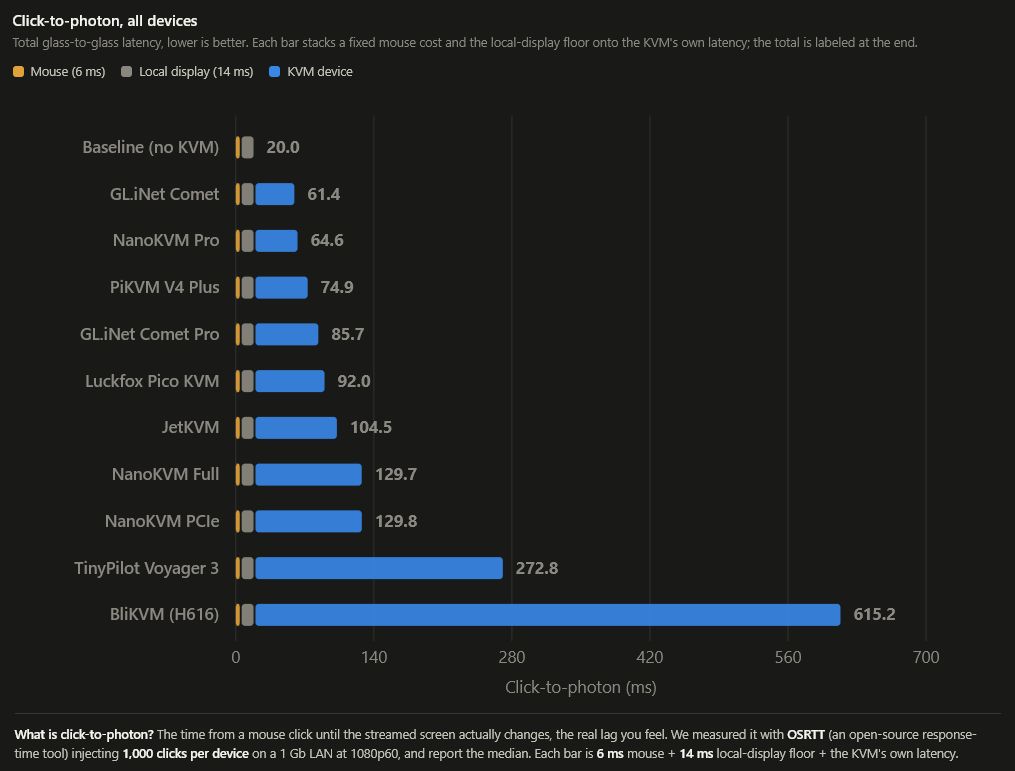
These IP KVM latency benchmarks are the number nobody else publishes: the actual click-to-photon latency of ten IP KVMs, measured on one rig with one method. Vendors quote encode times that ignore the network, the decode, and the display. We measured the whole path, from an injected click to the pixel changing on the client screen, so the figures reflect what you actually feel. The GL.iNet Comet led at 55 ms and the BliKVM trailed at 609 ms, and the spread between them is a story about capture hardware, not marketing.
The full results
Every figure is the median of 1,000 injected clicks at 1080p60 over a wired LAN. "Measured" is the raw click-to-photon time. "End-to-end" adds a real wired mouse (about 6 ms). The KVM-added figure, which isolates the device by subtracting our 14 ms client-display floor, is discussed below.
| Device | Measured median | End-to-end (with mouse) | Capture path |
|---|---|---|---|
| GL.iNet Comet | 55.4 ms | 61.4 ms | Lontium CSI bridge |
| Sipeed NanoKVM Pro | 58.6 ms | 64.6 ms | Lontium CSI bridge |
| PiKVM V4 Plus | 68.9 ms | 74.9 ms | Toshiba TC358743 CSI |
| GL.iNet Comet Pro | 79.7 ms | 85.7 ms | Lontium CSI bridge |
| Luckfox PicoKVM | 86.0 ms | 92.0 ms | Toshiba TC358743 CSI |
| JetKVM | 98.5 ms | 104.5 ms | Toshiba TC358743 CSI |
| Sipeed NanoKVM Full | 123.7 ms | 129.7 ms | Lontium CSI bridge |
| Sipeed NanoKVM PCIe | 123.8 ms | 129.8 ms | Lontium CSI bridge |
| TinyPilot Voyager 3 | 266.8 ms | 272.8 ms | Toshiba TC358743 CSI |
| BliKVM v4 | 609.2 ms | 615.2 ms | MacroSilicon MS2131 (USB 2.0) |
How we measured it
We time click-to-photon with an OSLTT light sensor: a target machine runs a flash-test page that flips color on click, we inject clicks through the KVM's own emulated mouse, and the sensor on the client screen records when the pixel actually changes. Every device sees the same clean 1080p60 source over the same wired LAN, and we take 1,000 samples per device and report the median, not a hand-picked best case. The full protocol, including why we subtract a 14 ms display floor to isolate the KVM and add a 6 ms mouse constant for end-to-end figures, is in our OSLTT latency rig writeup and our testing methodology.
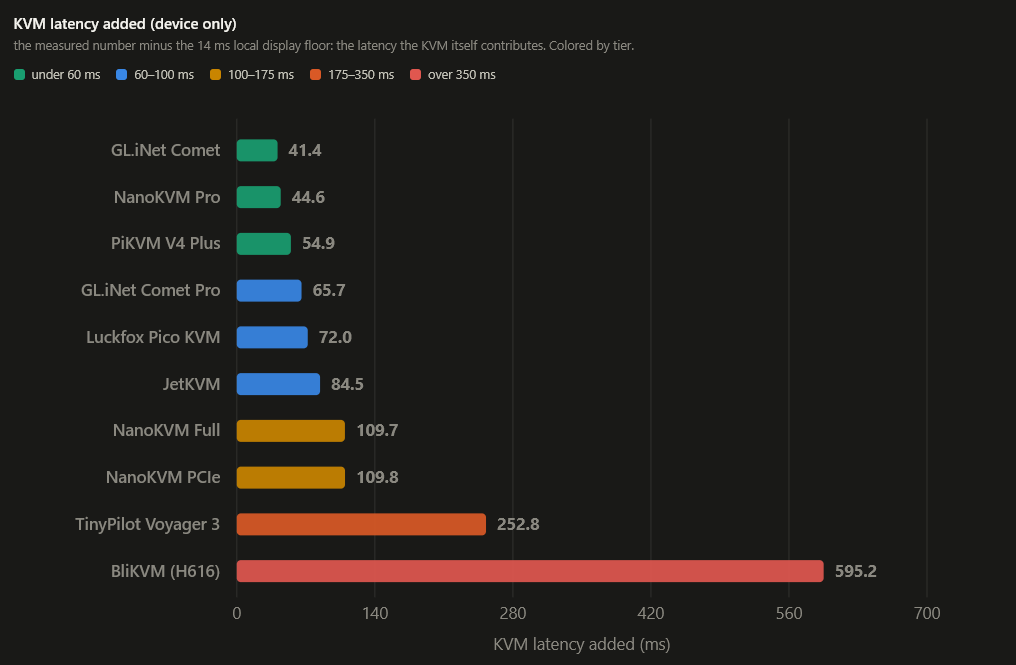
That 14 ms floor matters for interpretation. Subtract it and you get the latency the KVM itself adds: about 41 ms for the Comet, 55 ms for the PiKVM, 85 ms for the JetKVM, and a striking 595 ms for the BliKVM. The device is responsible for the differences; the floor is constant across all of them.
What the results show
Three clear findings come out of the data.
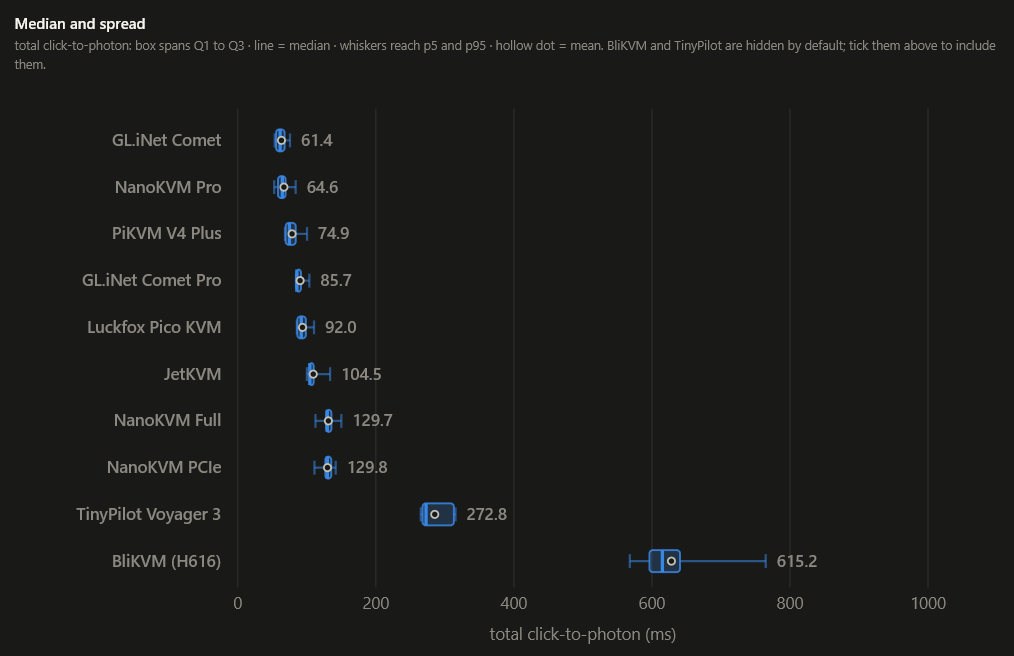
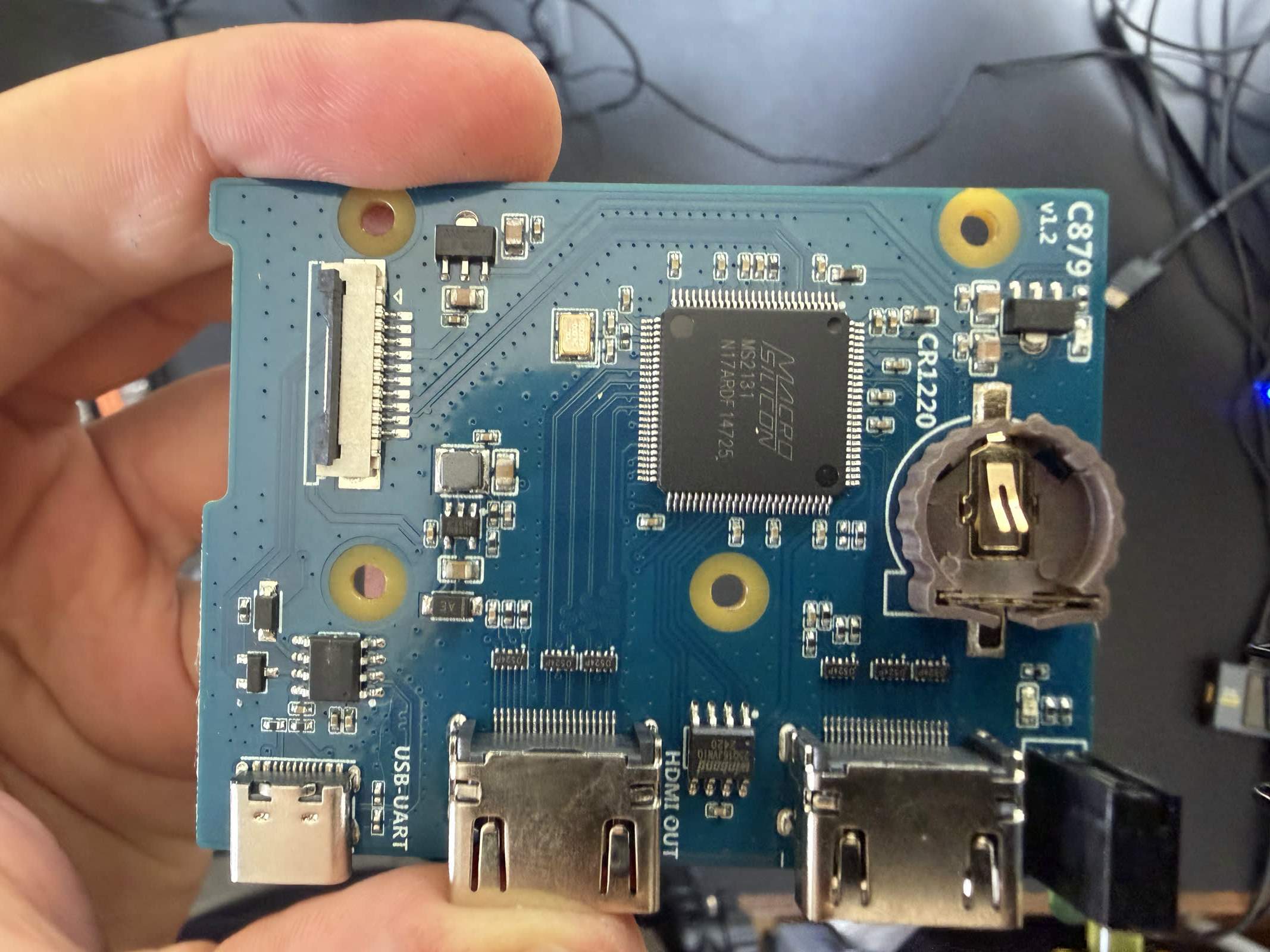
The capture path decides everything. The single biggest predictor of latency is not the processor or the price; it is how the device captures HDMI. The nine devices that use a MIPI-CSI bridge (Toshiba or Lontium) feeding the SoC directly land between 55 and 267 ms. The one device that captures over USB, the BliKVM with its MacroSilicon MS2131 running on a USB-2-only Allwinner SoC, sits alone at 609 ms, more than double the next-slowest. A direct CSI path is the price of admission for a responsive KVM. The chip-by-chip map is in our capture chip database.
More expensive is not faster. The fastest device we tested, the GL.iNet Comet at 55 ms, costs around $90. The premium CM4-based devices did not lead: the PiKVM landed a respectable 69 ms, but the TinyPilot, on the same Raspberry Pi CM4 and the same Toshiba capture chip, measured 267 ms, nearly four times slower. That gap is not hardware; it is software and tuning, and it is the clearest evidence in the whole dataset that configuration matters as much as silicon. The reasons are in our hardware encoder guide.
The budget devices punch above their weight. The sub-$100 Comet, the $155 NanoKVM Pro, and even the $35 Luckfox all beat the $400 TinyPilot on raw latency. Cheap does not mean slow in this category, provided the capture path is right.
The device-by-device picture
- GL.iNet Comet (55.4 ms): the outright leader, a quad-core Rockchip with a Lontium CSI bridge and tightly tuned firmware. Full detail in the Comet review.
- NanoKVM Pro (58.6 ms): the fastest 4K-capable device, thanks to its Axera AI SoC. See the NanoKVM review.
- PiKVM V4 Plus (68.9 ms): the fastest of the CM4 devices and the reference for the open-source stack. See the PiKVM review.
- GL.iNet Comet Pro (79.7 ms): slower than the base Comet despite costing more, the tradeoff for its 4K capability.
- Luckfox PicoKVM (86.0 ms): the $35 JetKVM clone that, oddly, beat the original it copies. See the PicoKVM review.
- JetKVM (98.5 ms): mid-pack and perfectly usable, on the same Toshiba chip as the pricier CM4 devices. See the JetKVM review.
- NanoKVM Full and PCIe (123.7 / 123.8 ms): the RISC-V budget devices, slower but the most power-efficient we tested.
- TinyPilot Voyager 3 (266.8 ms): the surprise, slow on capable hardware because its software exposes little to tune. See the TinyPilot review.
- BliKVM v4 (609.2 ms): the outlier, bottlenecked by USB 2.0 capture. Fine for patient administration, poor for interactive work. See the BliKVM review.
Defaults versus tuned
These figures are default-configuration numbers, which is what most buyers actually experience out of the box. Several devices can be improved with settings, a lower bitrate matched to the link, a shorter keyframe interval, a low-latency encoder mode, and we cover that in how to reduce IP KVM latency. But a device whose defaults are conservative, like the TinyPilot, cannot always be tuned back to the front of the pack, and one bottlenecked in hardware, like the BliKVM, cannot be tuned at all. We report defaults because they are honest and comparable; your mileage improves from there where the device allows it.
The verdict
FAQ
FAQ
In our testing, the GL.iNet Comet, at 55.4 ms measured click-to-photon on a wired 1080p60 LAN, the fastest of ten devices. The NanoKVM Pro (58.6 ms) and PiKVM V4 Plus (68.9 ms) followed. Notably, all three beat the far pricier TinyPilot.
We use an OSLTT light sensor to time click-to-photon: from an injected click, through the KVM's emulated mouse to the target, through capture, encode, network, decode, to the pixel changing on the client screen. We take 1,000 samples per device at 1080p60 over wired LAN and report the median. The full method is in our OSLTT rig writeup.
Its capture path. The BliKVM captures HDMI over USB (a MacroSilicon MS2131 running at USB 2.0 speeds on an Allwinner SoC), rather than through a direct MIPI-CSI bridge like every other device. That USB link is the bottleneck, and it is why the BliKVM measured 609 ms versus 69 ms for a PiKVM on the same software family.
No. Our fastest device, the GL.iNet Comet at 55 ms, costs around $90, while the $400 TinyPilot measured 267 ms. Latency tracks the capture path and firmware tuning far more than price. Several sub-$100 devices beat the premium ones outright.
Every figure here was measured on our own bench with an OSLTT rig; the full protocol and raw method are in our OSLTT latency writeup and testing methodology. Disclosure: this is published by WarpKVM, which is developing a 4K60 IP KVM of its own and will publish its numbers on this same rig, held to the same method.